 Dela
DelaProduct analytics
Coarse, account-unlinked milestones. Health entries, notes and account details are excluded.
Setting: “Help us improve”
Sharing, data and account controls.
Separate controls
In the app: Settings → Privacy & account
All four are off by default
Minimal account-unlinked reliability signals remain active to help operate and secure the app. What Dela collects
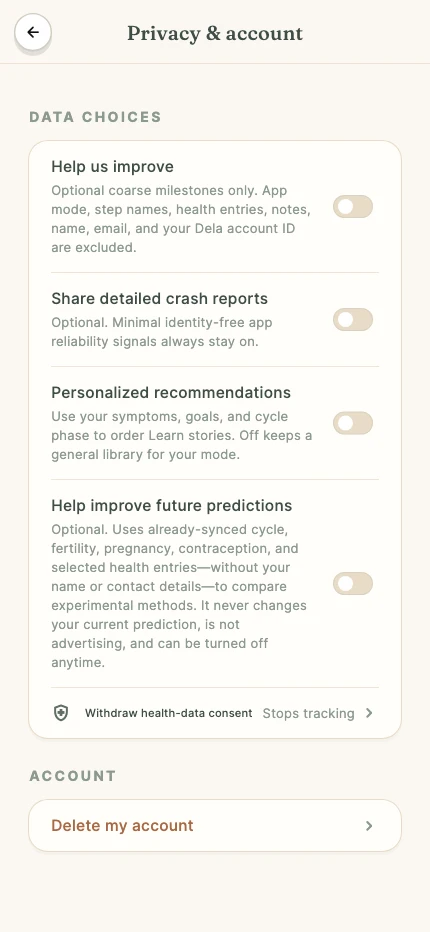
Prediction improvement is off unless you turn it on, and turning it off again ends your part in model evaluation. Predictions for your account keep working exactly the same. How predictions use data
Settings → Partner sharing
A partner accepts your invitation, then sees only the read-only summary categories you allow. Notes and journal text are not shared.
Revoking access stops new access after the server confirms it. Copies another person saved may remain.
Settings → App lock
Protect Dela on this phone with a passcode, and Face ID or fingerprint unlock where available.
App lock protects access on your device. It does not change how your cloud record is processed.
In Community
Approved posts are visible to other signed-in members. Your display name is a pseudonym; Dela keeps an account link for moderation.
Delete your own posts, or report and block other content. Copies saved outside Dela are beyond these controls.
Correct entries in the app, take a copy, or review what happens when you leave.
Take a copy
Settings → Export data
Export selected reports or request a full archive. A full archive requires an email verification code.
An exported file is outside Dela’s app lock. Keep it somewhere private.
Get help with an exportWhen you leave
Settings → Privacy & account
Deletion stops tracking and starts removal of your account and health records. Export anything you want to keep first.
Legal exceptions apply. The deletion record is a one-way digest of your email address and a minimal deletion audit record, with no health data. Deleting the app alone does not delete your cloud account.
Retention and deletion in fullPrivacy requests
Use the form for requests you can’t complete in the app. We may need to verify account ownership.